Page 1 of 1
3.28.1 installer
Posted: Thu Jun 08, 2023 7:42 pm
by JaxsonEarwood
i have downloaded the "QCAD/CAM 3.28.1 for Windows 64bit (installer)" on a compute but everytime i try to open it it brings up a screen stating that it has already been downloaded and wants to know if i want to replace the existing one. the only option that it gives me is to remove the file. i have only downloaded this file once. im not sure what my issue is but im hoping you may be able to help.
Re: 3.28.1 installer
Posted: Thu Jun 08, 2023 8:05 pm
by Husky
For clarification reasons ...
Do you get the warning after you downloaded the installation packet or after you tried to install the packet?
In the first case: If a file exist in your download folder with the same name it will ask you to overwrite that file or not.
In the second case: If you try to install the msi it will check your PC for an existing installation and ask you to replace that installation or not.
Both scenarios are safe to accept a overwrite/replacement of those files.
Re: 3.28.1 installer
Posted: Thu Jun 08, 2023 9:17 pm
by JaxsonEarwood
both instances have happened, but even with that being said once i either override or replace. i still cannot get the setup wizard to open the file. it just takes me back to this screen.
Re: 3.28.1 installer
Posted: Thu Jun 08, 2023 9:27 pm
by Husky
What is the Windows Version? 10? 11?
You downloaded the installation file from the official QCAD download site ...
https://www.qcad.org/de/qcad-downloads-trial
... and the installation file you are trying to install is:
qcadcam-3.28.1-trial-win64-installer.msi. Correct?
Re: 3.28.1 installer
Posted: Fri Jun 09, 2023 8:20 am
by andrew
JaxsonEarwood: Please post a screenshot of the dialog or warning you are referring to or post the exact wording of the warning or message, so we an help efficiently, thanks.
Re: 3.28.1 installer
Posted: Wed Jun 14, 2023 6:37 pm
by JaxsonEarwood
attached is a screenshot of the issue.
Re: 3.28.1 installer
Posted: Wed Jun 14, 2023 8:11 pm
by CVH
I would opt to remove ...
I would remove all instances of QCAD and QCAD/CAM installed by an msi.
Then one could start from fresh.


Regards,
CVH
Re: 3.28.1 installer
Posted: Wed Jun 14, 2023 8:35 pm
by andrew
JaxsonEarwood: This dialog of the Windows installer actually simply means that the exact version of QCAD/CAM you are trying to install (3.28.1) is already installed on your system. Therefore you cannot install it again.
To start QCAD/CAM, you need to launch it from the start menu, not run the installer again.
In other words:
Running the downloaded installer will install the software on your computer. This has already happened, the installer does not need to be started again.
Running the QCAD/CAM software is a different procedure. You can now for example navigate to "C:\Program Files\QCADCAM" in Windows Explorer and run the "qcad" or "qcad.exe" executable from there or you can launch QCAD/CAM from the Windows start menu.
I hope that helps.
Re: 3.28.1 installer
Posted: Wed Jun 14, 2023 8:46 pm
by CVH
andrew wrote: ↑Wed Jun 14, 2023 8:35 pm
Running the downloaded installer will install the software on your computer. This has already happened, the installer does not need to be started again.
Shouldn't the installer ask to run QCAD/CAM after installation?
And probably there is a start shortcut created in the Start Menu and/or on the desktop ...
Regards,
CVH
Re: 3.28.1 installer
Posted: Wed Jun 14, 2023 8:54 pm
by JaxsonEarwood
there isnt an option in the start tab for qcad? previous programs that ive downloaded always ask if you want to open once installed. is QCAD not that way?
Re: 3.28.1 installer
Posted: Wed Jun 14, 2023 8:57 pm
by CVH
JaxsonEarwood wrote: ↑Wed Jun 14, 2023 8:54 pm
there isnt an option in the start tab for qcad?
Odd, never had that issue ...
You could however create the start shortcut yourselves ...
Regards,
CVH
Re: 3.28.1 installer
Posted: Wed Jun 14, 2023 9:01 pm
by CVH
I have a few side by side ... Except the 'DEBUG' all were created on installation.
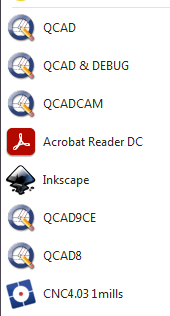
- QCADinSTART.png (10.69 KiB) Viewed 92978 times
Regards,
CVH
Re: 3.28.1 installer
Posted: Thu Jun 15, 2023 6:47 am
by andrew
JaxsonEarwood wrote: ↑Wed Jun 14, 2023 8:54 pm
there isnt an option in the start tab for qcad?
Can you try the search button (or field, depending on your Windows version) in the Windows bar at the bottom (enter "qcad")?
JaxsonEarwood wrote: ↑Wed Jun 14, 2023 8:54 pm
previous programs that ive downloaded always ask if you want to open once installed. is QCAD not that way?
No, the downloaded installer is really for installation only, not for running the software.