Trim Both
Toolbar / Icon:


Menu:
Modify > Trim Both
Shortcut:
T, M
Commands:
trim2 | extend2 | tm
Description
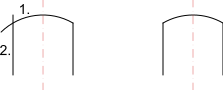
Section titled “Description”Trims or extends two lines, arcs or ellipses to their common intersection point.
- Choose the first entity to be trimmed.
- Choose the second entity to be trimmed.
- Right click twice or press Escape twice to terminate the tool.