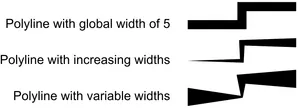
Custom Lineweights
Introduction
Section titled “Introduction”QCAD supports a fixed set of lineweights. The lineweights available might seem somewhat arbitrary but are defined in the DXF/DWG standard. Being able to add other, custom lineweights in QCAD would break compatibility with any other DXF/DWG compatible CAD software.
However, there is a possibility to get around this limitation: custom segment widths for polylines. To make use of this feature, make sure that your entity is a polyline. Almost all entities can be easily converted to polylines, for example using Draw > Polyline > Create from Segments for lines or arcs or using Modify > Explode for splines or ellipses.
Global Width of a Polyline
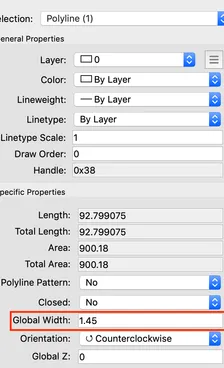
Section titled “Global Width of a Polyline”You can select one or multiple polylines and use the property editor (View > Property Editor) to assign any custom lineweight (global width):
Widths per Segment
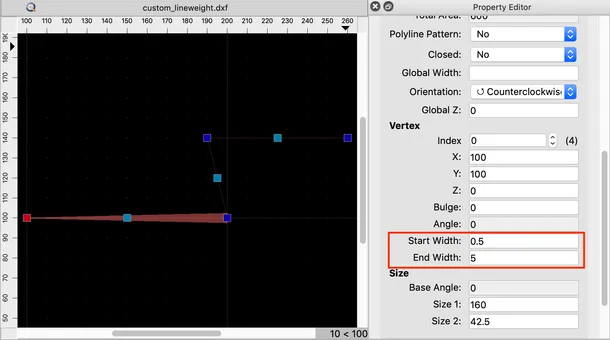
Section titled “Widths per Segment”Alternatively, you can assign custom lineweights to the start or end of an individual segment of the polyline (properties start width and end width). In this example, the start width of the first segment was set to 0.5 and the end width to 5:
Examples
Section titled “Examples”